

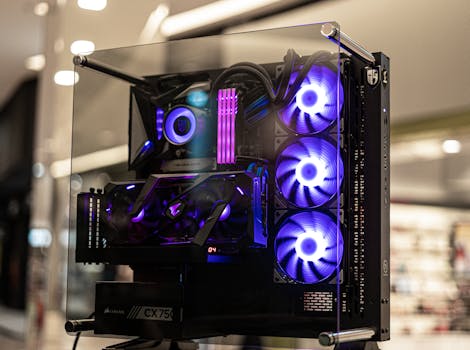
There’s a distinct hum that emanates from a truly optimized PC, a quiet confidence that whispers of meticulously managed thermal loads and components running at their absolute peak. For many enthusiasts, this level of performance and quiet operation isn’t just a dream; it’s the tangible result of investing in a custom water cooling PC. While off-the-shelf AIOs (All-In-One) offer a convenient entry point, the world of custom loops is where thermal management truly transcends mere functionality, becoming an art form and a science. This isn’t about slapping some RGB tubing in a case; it’s about understanding the nuanced interplay of thermodynamics, fluid dynamics, and component compatibility to achieve a system that performs, and looks, unlike any other.
Decoding the Performance Edge: Why Go Custom?
The allure of a custom water cooling PC often begins with a desire for superior thermal performance. Unlike air coolers, which rely on convective heat transfer to ambient air, water cooling utilizes a liquid coolant with significantly higher heat capacity. This means water can absorb more heat from components like CPUs and GPUs before its temperature rises substantially.
Superior Heat Dissipation: The large surface area of radiators, combined with high-flow pumps and efficient blocks, allows for more effective heat removal from critical components. This translates directly into lower operating temperatures, even under sustained heavy loads.
Reduced Thermal Throttling: When components overheat, they often reduce their clock speeds to prevent damage – a phenomenon known as thermal throttling. Lower temperatures achieved with custom loops minimize or eliminate this, allowing your hardware to consistently perform at its advertised speeds, and often beyond.
Quieter Operation: Counterintuitively, a well-designed custom loop can be quieter than a high-end air cooler. By distributing heat across larger radiators, fan speeds can be kept lower, significantly reducing audible noise. The pump noise is also typically minimal and can be further mitigated by choosing quality components.
The Anatomy of a Custom Loop: Core Components and Their Roles
Building a custom water cooling PC involves assembling a network of specialized parts. Each component plays a crucial role in the overall efficiency and reliability of the system.
#### The Heartbeat: Pumps and Reservoirs
The pump is the engine of your loop, responsible for circulating the coolant. Choosing a reliable pump with sufficient head pressure is paramount, especially for complex loops with multiple blocks and radiators. Reservoirs serve a dual purpose: they provide a convenient filling point and allow air bubbles to escape the loop, preventing potential issues.
Pump Types: D5 and DDC pumps are the most common choices, each with its own strengths in terms of flow rate and head pressure.
Reservoir Size: Larger reservoirs generally make filling and bleeding the loop easier.
#### The Heat Exchange: Blocks and Radiators
Water blocks are engineered to maximize heat transfer from specific components. For a CPU, this involves a micro-fin structure that precisely conforms to the chip’s heat spreader. GPU blocks often cover not just the GPU die but also VRAM and VRMs, offering comprehensive cooling. Radiators are where the absorbed heat is dissipated into the ambient air.
Radiator Thickness and Fin Density: Thicker radiators and those with higher fin density (FPI – fins per inch) offer greater cooling potential but require fans with higher static pressure to push air through effectively.
Block Materials: Copper blocks generally offer superior thermal conductivity compared to aluminum.
#### The Veins and Arteries: Tubing and Fittings
Tubing carries the coolant, and fittings connect everything. The choice between soft tubing (flexible PVC or EPDM) and hard tubing (PETG, acrylic, or metal) significantly impacts the aesthetics and complexity of the build.
Soft Tubing: Easier to install, more forgiving for beginners, and generally more affordable.
Hard Tubing: Offers a cleaner, more professional look but requires precise bending and specialized tools, increasing build time and potential for errors.
Fitting Types: Compression fittings are standard for both soft and hard tubing, providing a secure and leak-free seal.
Beyond Performance: The Aesthetic Dimension of a Custom Water Cooling PC
While the thermal benefits are undeniable, the visual appeal of a custom water cooling PC is often a primary motivator. The intricate arrangement of tubing, the vibrant coolant colors, and the clean, uncluttered look can transform a PC from a functional machine into a work of art.
Color Coordination: Coolant dyes, fitting colors, and even the choice of tubing can be meticulously coordinated to match a build theme.
Tubing Runs: The way tubing is routed can dramatically alter the visual impact. Straight runs, clean bends, and strategically placed components create a sense of order and deliberate design.
Customization Options: From bespoke pump tops to engraved blocks, the level of personalization is virtually limitless.
Navigating Potential Pitfalls: Key Considerations for a Smooth Build
Embarking on a custom water cooling PC project requires meticulous planning and execution. Several common pitfalls can be avoided with careful consideration.
Leak Testing: This is arguably the most critical step. A pressure leak tester allows you to check for leaks before filling the loop with coolant, minimizing the risk of damage to expensive components.
Component Compatibility: Ensure that the chosen water blocks are compatible with your specific CPU and GPU models. Check radiator clearances within your case, and confirm that your pump has enough power for the loop.
Maintenance: Custom loops require periodic maintenance, including coolant flushes and filter cleaning, to ensure optimal performance and longevity.
Final Thoughts: The Calculated Investment in Peak Performance and Personal Expression
The journey to building a custom water cooling PC is not for the faint of heart, nor is it an impulsive decision. It demands a deeper understanding of PC hardware, a willingness to learn new skills, and a commitment to meticulous execution. However, for those who invest the time and effort, the rewards are substantial. You’re not just building a powerful computer; you’re crafting a statement piece that pushes the boundaries of what a PC can be, offering unparalleled thermal performance, remarkable silence, and a unique aesthetic that reflects your individual vision. It’s a calculated investment, yes, but one that pays dividends in both raw power and enduring satisfaction.